
Vibe Coding Beginner Guide (2026): How to Use AI to Build Small Apps That Make Your Life Easier
How non-technical people can build useful personal apps with AI in a weekend.


I built 5 apps last month.
Personal infrastructure that easily saves me 10+ hours a week.
I’m not a developer. I just typed what I wanted and AI wrote the code, built the app.
Took about two afternoons for each one.
Vibe coding.
And if you’re building anything, running a biz, making money online – you need to understand what just became possible.
People with no coding backgrounds are building real apps, tools, chrome extension, SaaS. Some use it to triple their output. Some replace tools they used to pay for every month. Some test product ideas in days instead of months. And yes, a few hit it big and sell their app for $ 100 Million (e.g. CalAI).
But the best way to start is not by trying to build the next big SaaS.
In this article, you’ll learn how to turn a recurring problem in your life into a small working app you can use now, and maybe turn into something bigger later.
We’ll cover:
what vibe coding is
which tool to use first
how to write a simple app brief
how to make the AI plan before coding
how to build without breaking everything
which prompts and guardrails actually help
and more
Let’s start.
What Vibe Coding actually is
Vibe coding turns plain English into working software.
Thats it.
Andrej Karpathy (former AI lead at Tesla and co-founder of OpenAI) coined the term in February 2025. He called it “fully giving in to the vibes” and forgetting the code exists. Within a year, 25% of Y Combinator’s Winter 2025 cohort had codebases that were 95% AI-generated.
You can use vibe coding in two ways.
To make money. Build small tools for businesses, create landing pages, launch simple SaaS products, sell internal dashboards, automate workflows, or test product ideas without hiring a developer.
To make your own life easier. Build a habit tracker that fits your exact routine, a finance dashboard that shows only the numbers you care about, a meal planner, a client tracker, a writing system. Tiny tools that are built for your exact bottlenecks and remove friction from your day.
Once you understand that, the next question is simple:
Which tool should you use?
The answer depends on what you are trying to build and how technical you are.
How to choose the right tool
There are dozens of vibe coding tools. You do not need dozens.
Pick one tool that matches your current skill level and the kind of project you want to build.
Here’s how:
a) If you have never coded before and want the fastest path to a working app, start with v0, Replit, Lovable or Bolt.
These run in the browser. No setup, no terminal, no local install. You describe what you want, and the tool builds the first version for you. Most have a free version to play around with.
My experience: Replit or v0 are the best general starting point. Lovable is good for clean design. Bolt is useful when you want to quickly turn an idea into a working web app.
b) If you want to keep it free or build quick prototypes, try Google AI Studio.
Good for fast demos, throwaway experiments, and testing ideas. You can prompt an app into existence, test it quickly, and deploy when it is worth keeping.
c) If you are a bit more technical and want more control, use Cursor.
Cursor is a code editor with AI built into it. You can chat with your codebase, ask it to make changes, review the edits, and slowly learn what the code is doing.
My experience: Cursor is the best middle ground between “AI builds everything for me” and “I want to understand the app I am building.”
d) If you want the most powerful setup, use Claude Code or Codex.
This is the advanced lane.
Codex is OpenAI’s coding agent for building features, fixing bugs, reviewing code, and working across projects.
Claude Code is Anthropic’s agentic coding tool that can read your codebase, edit files, run commands, and work inside your terminal or development environment.
Both are great for larger projects, multi-file edits, debugging, refactors, and real engineering work. They are less beginner-friendly than Replit or Lovable but beginners can still use them. The learning curve is steeper but once your projects get serious, they offer you maximum control.
My recommendation:
Start with Replit if you want the easiest all-around choice.
Start with Cursor if you want to learn how apps work.
Start with Claude Code or Codex if you have some technical confidence.
What you need to do before vibe coding
The time you spend thinking before you open the tool is the highest-leverage work.
Because the AI builds exactly what you describe.
The clearer you articulate what you want, the better the finished build.
So before you prompt, think.
What is this app in one sentence?
Example: A personal dashboard that shows my daily tasks, habits, weather, and schedule in one place.
Who is it for?
Example: Just me. A small team. Freelance clients. Restaurant staff. Students. Gym members.
What should the user be able to do?
Example: Add a task. Move a task. Upload a file. Track a client. Save a note. Generate a report. Book a table.
What screens does the app need?
Example: Home page, dashboard, login, settings, reports, calendar, profile, admin panel.
What information does the app store?
Example: Tasks, clients, invoices, bookings, meals, workouts, notes, inventory, payments.
What should it look like?
Example: Clean and quiet. Bold and modern. Premium and dark. Simple and friendly. Fast and minimal.
What should it not do yet?
Example: Do not add payments. Do not add social login. Do not redesign the layout. Do not change working features. Do not add extra features unless I ask.
Your job is to give AI direction.
The better you direct, the better it builds.
The 4-step vibe coding workflow
Once your brief is written, follow the same loop for every project.
Step 1: Plan before you build
Paste your brief into the tool.
Do not ask it to build yet.
Ask it to create a plan first.
Use this prompt:
“Before writing any code, give me a step-by-step plan for how you would build this app. Include the main features, the files you would create, the order you would build them in, and anything that might cause problems.”
Tip: If you are using Claude Code, use Plan Mode. Press Shift + Tab twice. This lets the AI inspect the project and create a plan before it changes anything.
Read the plan before you approve it.
This is where you catch bad ideas early. If the AI wants to add features you did not ask for, cut them. If the plan feels too complex, ask it to simplify.
Optional advanced add-on: Superpowers
If you are using Claude Code, Codex, Cursor, Gemini CLI, or another coding agent, look into Superpowers by obra.
It is a free workflow layer for AI coding agents. It helps the AI ask better questions, write specs, create plans, debug issues, review code, and finish tasks in a more structured way.
You do not need this for your first Replit or Lovable project.
Step 2: Build one small piece at a time
Never ask the AI to build the whole app in one go. That is how you get a huge mess you do not understand.
Build in small pieces:
First, build the basic layout.
Test it.
Then build the first feature.
Test it.
Then build the next feature.
Test it.
Each step should be small enough that if something breaks, you know where the problem came from. When something looks wrong, use screenshots.
A good rule:
One prompt = one change.
Step 3: Fix it while protecting what works
When the AI fixes something, tell it to keep the rest of the app untouched.
Use this sentence often:
“Fix only this issue. Do not change anything else, do not change unrelated layout, styling, or functionality.”
This is important because AI tools sometimes fix one thing while changing others that should not have been changed.
Step 4: Ship it
When the app works well enough, deploy it.
Most tools have simple deployment built in. Replit can deploy directly. Google AI Studio can deploy to Cloud Run. Cursor projects can go to Vercel or Netlify. Claude Code or Codex can help you push a project live if your setup is ready.
Advanced: How to avoid messy code
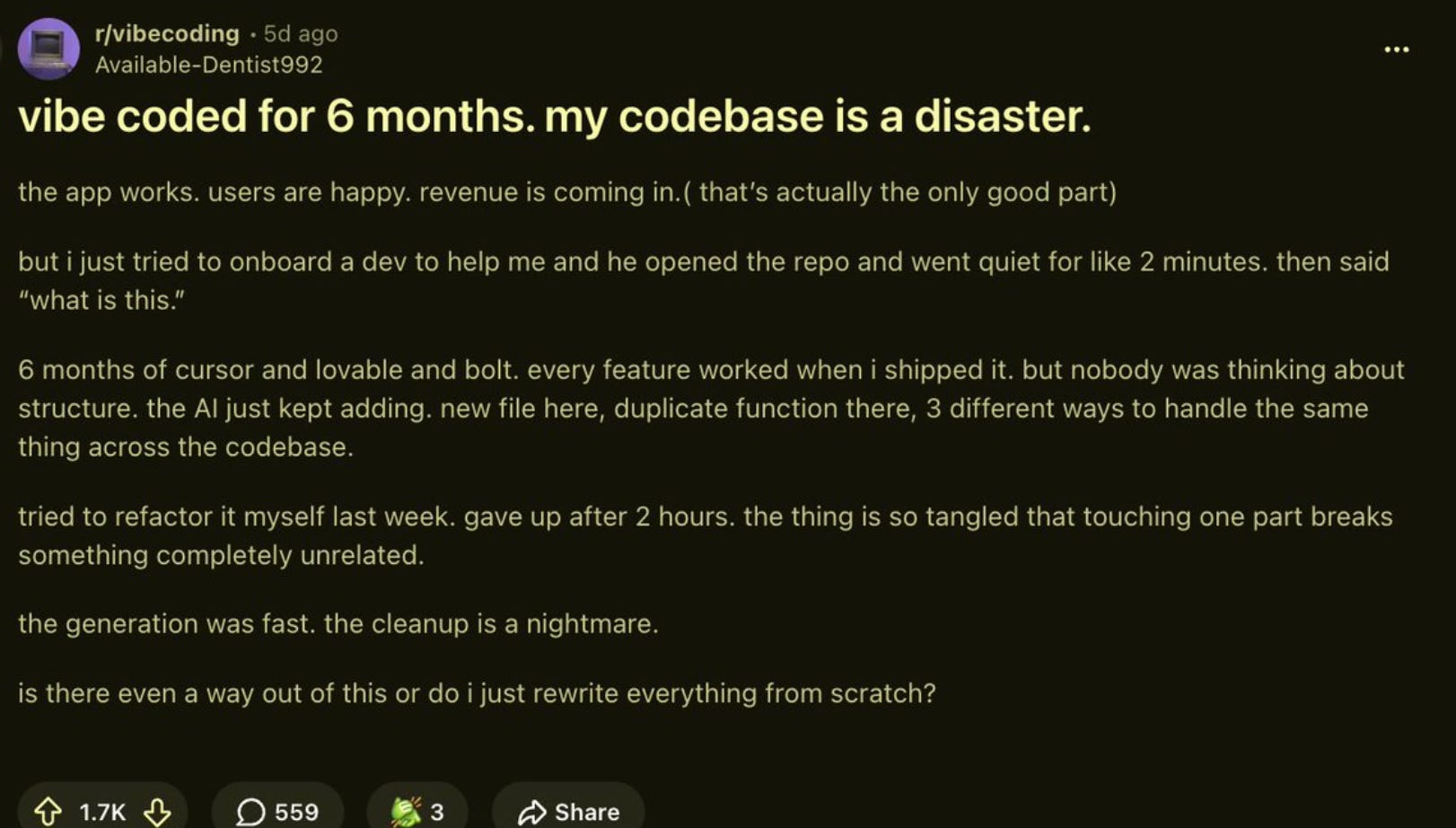
A common pattern with vibe-coded apps is this:
The first version works, users show up, then every new change becomes super difficult because the codebase has no structure.
How to avoid this once you start vibe coding bigger projects:
Let Claude grill you before it starts coding
Install the grill-me skill from Matt Pocock and force Claude to interrogate and ask you questions on every decision before vibe coding changes. Do not describe a feature and let Claude immediately start building.
Keep one source of truth for the project
Pick your stack and write it down: database, auth, framework, folder structure, design rules, known issues, and what the AI should not change. Put it in a CLAUDE.md, project.md, rules.md, or whatever your tool supports. Then tell the AI to read it before every session.
This stops the AI from making up new architecture every time you open a fresh chat. Without a source of truth, one session might build your app one way, the next session might assume a different pattern, and now you have a Frankenstein project.
Do not let the AI touch code it does not understand.
If you are adding a feature, point the AI at the specific files involved. If you are fixing one bug, tell it to identify the exact files needed for the fix before editing. A useful line is: “Before editing, identify the exact files needed for this change. Do not modify unrelated files.”
Commit after every working feature
When something works, save it. Use Git, checkpoints, a copied folder, or whatever backup system is easiest for you. You need a clean way back in case something breaks.
Use regular cleanups
Every week or two, ask the AI to review one folder or one feature. Tell it to look for duplicate functions, unused imports, messy naming, dead code, and repeated logic. Keep it narrow. One folder at a time.
Write tests as you go
Once the app has users, payments, login, important data, or anything you depend on, ask the AI to write simple tests. You can say: “Write a basic test that confirms this feature works with valid input and fails safely with invalid input.”
Vibe coding gets you speed, but speed without structure turns into mess.
Bottom Line
You can now now fix tiny, annoying, expensive problems that were never worth hiring a developer for. You can vibe code small private tools that save time, remove friction, reduce decisions, and make your life easier.
A normal software product has to serve thousands of users. Your app only has to serve one person: you.
That is why it can be simple. That is why it can be ugly. That is why it can be built in an afternoon and still be valuable.
This is the weekend assignment:
Pick one recurring problem in your life.
Write down what the tool should do.
Open Replit, Lovable, v0, Cursor, Claude Code, or Codex.
Build the smallest version.
Use it on Monday.
And most importantly:
Have fun. :-)
Appendix: What I built this month
To make this less abstract, here are the five small apps I built this months. Each one removes friction from my life or business.
1. Lead and follow-up tracker
This app tracks every person in my pipeline, when I last contacted them, what stage they are in, and who has gone cold. Replaces my $100/month CRM.
2. Content repurposing app
This one is simple: I paste in a Substack article, and it turns it into 5 X posts, a LinkedIn version, and a short email.
3. Outfit app
This app knows my wardrobe and creates a daily outfit based on the pieces I own, the weather, the occasion, and the style inspirations I fed it. Stops me from wasting mental energy on trivial clothing choices without having to wear the same outfit every day like Steve Jobs.
4. Proposal and offer generator
This app creates a formatted client proposal from three inputs: client name, problem, and budget range. It writes the proposal in my voice and gives me a clean first draft I can edit quickly.
5. Personal finance dashboard
This app pulls my key numbers into one clean view: monthly burn, income by stream, and trend over time.